


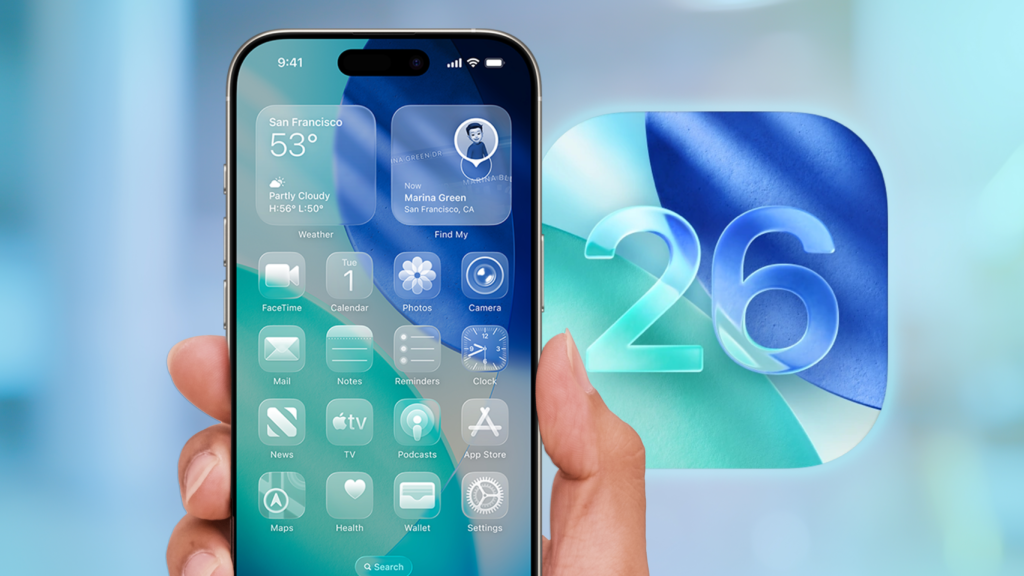
As Apple continues to innovate, the release of iOS 26 brings an exciting twist to iPhone customization with the introduction of Liquid Glass Icons. This new feature promises to transform the way users interact with their home screens, offering a fresh aesthetic that marries form with function.
A Revolutionary Design Approach
The Liquid Glass Icons are a bold departure from traditional flat design elements. These icons capture light and add depth, offering a dynamic and fluid appearance that changes with the ambient light conditions. This design overhaul not only enhances visual appeal but also aligns with Apple’s ongoing efforts to provide more immersive user experiences.
The innovation doesn’t stop with aesthetics—these icons are crafted for functionality, ensuring that iPhone users can enjoy both style and substance. The icons seamlessly integrate with the overall design language of iOS, maintaining consistency while still delivering a visually stunning effect.
How to Enable Liquid Glass Icons
Apple has made it straightforward for users to switch to these new icons. To enable Liquid Glass Icons, iPhone users need to navigate to the settings menu. Here’s a simple step-by-step guide:
- Open the Settings app on your iPhone.
- Scroll down and tap on Display & Brightness.
- Select Icon Style and choose Liquid Glass from the options.
- Confirm your choice, and the change will be applied immediately.
This level of customization underscores Apple’s commitment to giving users greater control over their device’s appearance, allowing personalization without compromising superior performance.
Compatibility and Performance
The Liquid Glass Icons are compatible with all devices capable of running iOS 26. However, users will need to ensure their devices are updated to the latest OS to enjoy this feature. Apple has optimized these icons to have minimal impact on battery life and performance, ensuring that the update enhances rather than hinders the user experience.
The Impact on User Interaction
With the introduction of Liquid Glass Icons, Apple is not just offering a superficial update. This change enhances the tactile experience of navigating through apps, as the dynamic nature of the icons creates an engaging and responsive interface. The fluid motion of these icons can potentially change how users perceive and interact with their devices on a daily basis.
Through this update, Apple is pushing the boundaries of visual computing on mobile devices. The Liquid Glass Icons reflect a broader trend in technology, where the line between digital and physical experiences continues to blur, providing users with richer interactions and more immersive environments.
Customer Response and Future Prospects
The early response to the Liquid Glass Icons has been overwhelmingly positive. Users appreciate the fresh look and the ease with which the change can be applied. As more users update to iOS 26 and experiment with these new features, Apple is likely to receive valuable feedback that could influence future design iterations.
Furthermore, the Liquid Glass Icons set the stage for future innovations in user interface design. As mobile technology continues to evolve, these developments could pave the way for more transformative updates, including potential collaborations with third-party developers for enhanced customization options.
In summary, with the release of iOS 26, Apple’s introduction of Liquid Glass Icons reflects their dedication to advancing both aesthetic quality and user interaction. Whether for new buyers or existing iPhone users, these icons offer a compelling reason to explore the full capabilities of the latest iOS update.
, image: https://www.tomsguide.com/phones/iphones/ios-26-adds-new-liquid-glass-icons-heres-how-to-transform-your-iphone-homescreen