 Vanda Svobodova
Microsoft’s approach to integrating advanced artificial intelligence capabilities into everyday computing took a leap forward with its recent enhancement of the Copilot AI system. Originally unveiled as an assistant for Microsoft 365 applications, Copilot’s new capabilities now allow it to analyze and provide insights across the entire Windows desktop environment. This revolutionary development underscores Microsoft’s commitment to creating intelligent, context-aware systems that seamlessly integrate into user operations.
Transforming the Desktop Experience
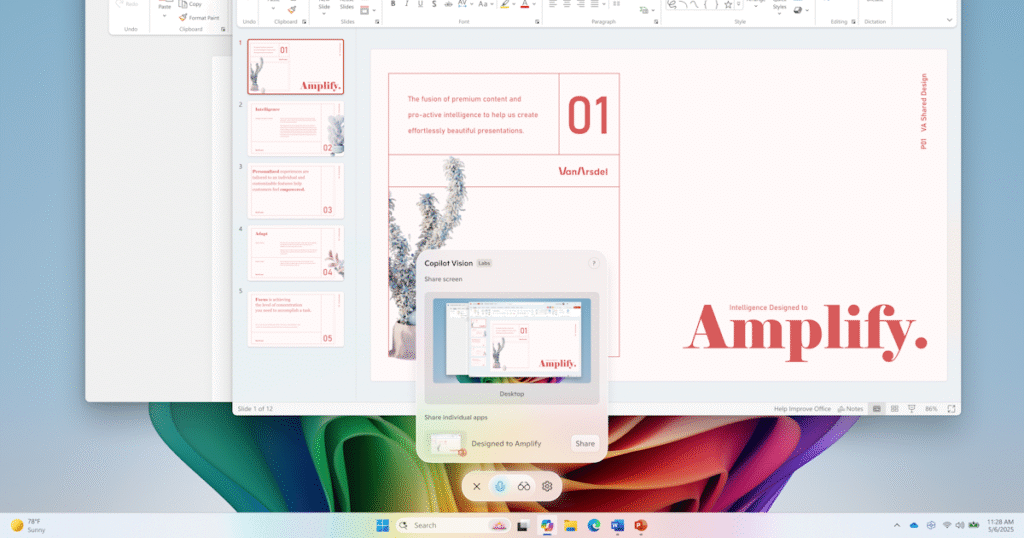
At the core of the latest upgrade is Copilot’s ability to scan and interpret everything on a user’s screen, linking the visual aspects of Windows with the power of AI. This not only enhances productivity by delivering instant feedback and suggestions but also unlocks new levels of personalization and utility in everyday computing tasks. Copilot’s capabilities go beyond mere text or voice commands, offering real-time analysis and interpretation of on-screen content.
The integration signifies an evolution in how users interact with their computers. For example, Copilot can now discern the content of emails, documents, and even images without requiring any active input from the user. Such features are designed to enhance productivity and allow users to remain focused by minimizing the need for manual searches or decision-making processes during routine tasks.
Advanced AI Integration
The enhanced Copilot AI utilizes advanced machine learning and vision AI, technologies that allow it to ‘see’ and understand the computer desktop just like a human does. This capability is grounded in complex algorithms that can recognize various types of content and context, offering smart suggestions and actions. This could range from summarizing a document to recommending actions based on the content users are working on, thereby creating a seamless link between the task at hand and the assistance provided.
By integrating with Windows systems at a fundamental level, Copilot promises an intuitive experience. This deep integration allows Microsoft’s AI to anticipate needs and perform tasks proactively, enhancing the potential for more efficient workflows in both personal and professional environments.
Security and Privacy Considerations
With such extensive access to a user’s desktop, security and privacy are at the forefront of Microsoft’s enhancements. The company assures users that all interactions with Copilot are secure, safeguarded by Microsoft’s robust privacy protocols. Furthermore, Microsoft has reaffirmed its commitment to ensuring that user data is not misused or unduly accessed, emphasizing that privacy features are deeply embedded within the AI’s functionality.
The enhanced version of Copilot comes equipped with customizable privacy settings, allowing users to dictate the level of interaction and data access. These settings make it possible to control and manage which applications or screen elements Copilot can access, ensuring that users retain control over their digital environment.
As Microsoft continues to innovate within the AI space, Copilot’s new capabilities represent a significant milestone in the evolution of personal computing. By making advanced AI accessible directly from the desktop, Microsoft is effectively laying the groundwork for a future where computers not only respond to commands but also anticipate user needs, thus transforming the very nature of everyday work and technology interaction.
, image: https://www.theverge.com/news/707995/microsoft-copilot-vision-ai-windows-scan-screen-desktop